
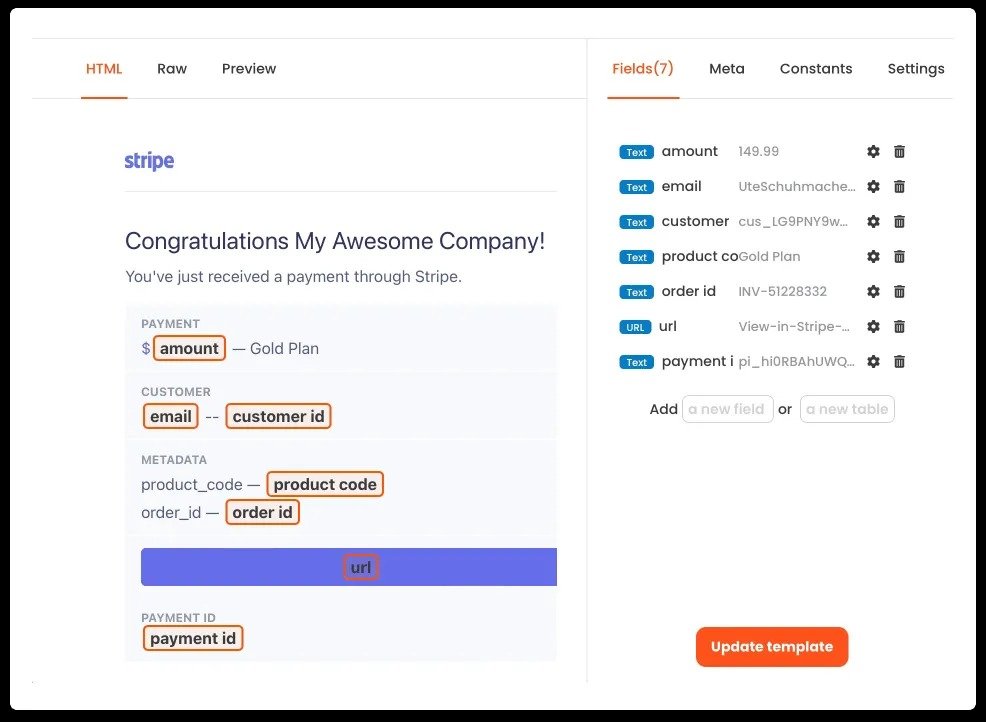
Use Parsio when your team repeatedly pulls data out of emails, PDFs, invoices, forms, or attachments and wants to move that data into structured workflows faster.
Skip it if your document volume is low, your inputs are highly inconsistent, or your process does not justify a dedicated parsing layer.
Pros
- +Strong fit for repetitive document workflows
- +Can save significant manual processing time
- +Useful bridge between raw inputs and automation
- +Relevant across operations and finance tasks
- +Better structured than copy-paste extraction
Cons
- −Best results still depend on input consistency
- −Setup may take time for complex document types
- −Not every small team needs dedicated parsing
- −Messy source documents can reduce reliability
- −Workflow value depends on downstream integrations
Key Features
Document and email parsing. Parsio is built for one core job: converting messy, unstructured inputs into usable fields that can support downstream workflows.
Structured extraction. Its practical value comes from helping teams avoid repetitive copy-paste work across invoices, receipts, forms, and similar operational documents.
Automation readiness. The platform becomes more useful when the extracted data is part of a larger workflow, such as routing records into spreadsheets, CRMs, accounting tools, or internal systems.
Operational efficiency. Parsio is less about flashy AI positioning and more about reducing manual document handling at scale.
Pricing
Pricing should be checked on the official website because extraction volume, usage limits, and integration needs matter more than a headline number alone. The key question is whether Parsio saves enough manual labor and reduces enough operational drag to justify the cost.
That value is easier to justify in teams processing recurring documents every week. It is less compelling for occasional or highly irregular document workflows.
Use Cases
- Finance teams: extracting data from invoices, receipts, and transaction-related files.
- Operations teams: routing structured information from recurring documents into internal workflows.
- Ecommerce teams: handling order-related records, forms, and email attachments more efficiently.
- Admin-heavy businesses: reducing repetitive manual data entry across routine back-office processes.
Alternatives
- If you need broader workflow automation beyond parsing itself → Zapier
- If your priority is OCR and document capture in finance-heavy workflows → DocuClipper
- If you mainly want no-code database-style process management → Airtable
The better comparison is not just which tool extracts fields, but which one fits the complexity, volume, and reliability requirements of your document workflow.
Final Verdict
When to use: Choose Parsio if your business repeatedly handles structured information trapped in emails, attachments, and documents, and you want to move that data into workflows with less manual effort.
When not to use: Do not choose it if your document volume is low, your inputs are too inconsistent, or your team does not need a dedicated parsing and extraction layer.