
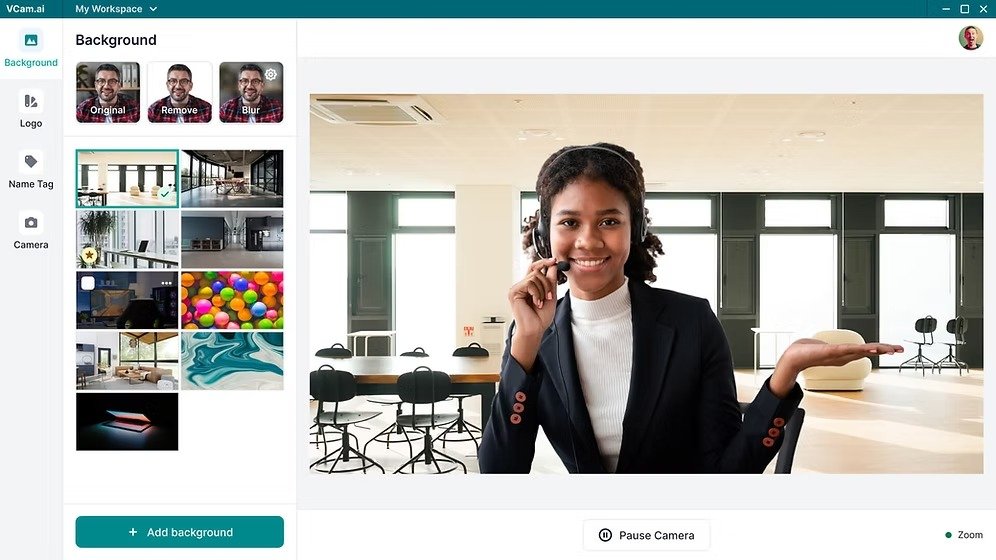
Use VCAM when you need talking-head or presenter-style video output without building a traditional filming setup.
Skip it if your work depends on highly custom cinematics, manual scene-by-scene direction, or a polished studio production process.
Pros
- +Removes the need for cameras and filming gear
- +Useful for repeatable presenter-led content
- +Can speed up production for small teams
- +Helpful for consistent on-screen communication
- +More accessible than traditional recording workflows
Cons
- −Less flexible than manual creative production
- −May feel limiting for bespoke brand storytelling
- −Output still depends on script and direction quality
- −Not every brand wants AI-presenter style video
- −Advanced editors may outgrow the workflow quickly
Key Features
Camera-free video creation. VCAM’s main appeal is clear: it lets users create presenter-style or camera-facing content without setting up lights, lenses, or repeated takes.
Faster content production. For users publishing educational, promotional, or communication-driven video content, the value is in reducing the friction between script and final output.
Consistency at scale. One likely advantage is maintaining a more consistent visual delivery style across multiple videos without depending on live recording conditions.
Practical business utility. The product appears most relevant where speed, clarity, and repeatable presentation matter more than cinematic originality.
Pricing
Pricing should be confirmed on the official website because the relevant question is not only cost, but what level of output quality, usage volume, and workflow savings you actually get in return.
The strongest value case is for teams producing recurring presenter-style video content. It is less compelling if your volume is low or your work requires a more handcrafted production approach.
Use Cases
- Educators and coaches: delivering video lessons or explanations without filming sessions repeatedly.
- Marketing teams: creating spokesperson-style updates, promos, and product explainers faster.
- Founders and operators: producing clear communication videos without maintaining a full video setup.
- Content creators: publishing regular camera-style content with less production overhead.
Alternatives
- If you want text-to-video workflows rather than presenter-led content → VideoInu
- If your priority is avatar-based business communication → Synthesia
- If you need broader template-driven video editing → InVideo
The better comparison is not just video quality, but whether VCAM matches the way you want to create, present, and publish content at scale.
Final Verdict
When to use: Choose VCAM if you need repeatable presenter-style videos without the cost, friction, and inconsistency of traditional filming.
When not to use: Do not choose it if your video work depends on manual creative control, custom cinematography, or a highly polished studio-first process.